

Dear Students,
The TEDUCard system at our University has recently been updated. With this update, TEDUCards have been redesigned to operate independently of any banking institution and will be used solely for access to campus facilities.
As part of the new system, students can enter the campus by using a QR code generated through the SoliClub mobile application. After downloading the application to your smartphone, you may register in the system using your student number and generate your personal QR code, enabling a fast and convenient transition through the campus turnstiles.
In line with the University’s sustainability and digitalization vision, physical cards will not be issued by default. Instead, the use of the SoliClub mobile application will be encouraged.
We wish you a healthy and successful academic year.
How to Use TEDUCard Mobile Application?
1) Download The Application
Download the Application for free
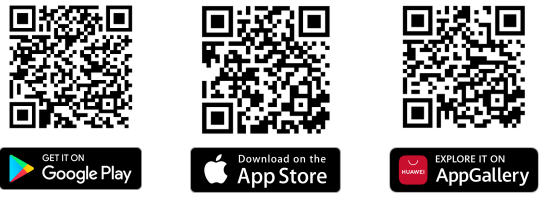 You can download the app for free from the App Store, Google Play and Huawei AppGallery. By scanning the QR codes, you can go directly to the SoliClub app in the market, or you can access the app by typing SoliClub in the search bar of the app market.
2) Register
Sign up for free if you have not registered before.
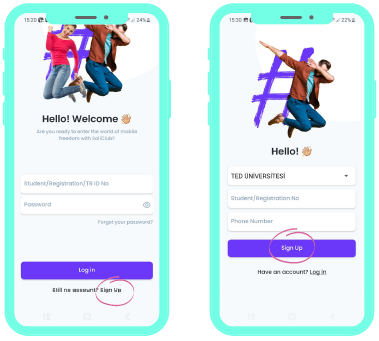 When you open the application, click the “Register” link at the bottom of the screen. On the page that opens, first select your university, enter your “Student Number” if you are a student, or your “TR Identity Number” if you are a staff member, and enter your mobile phone number, then click the “Register” button.
3) Verify your number
Enter the code received on your phone
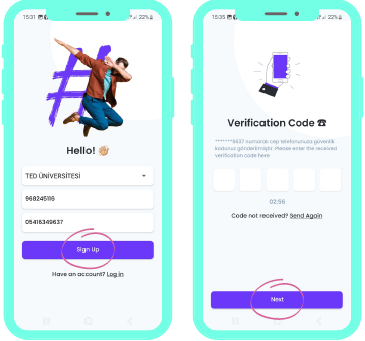 After pressing the “Register” button, a verification code will be sent to the mobile phone number you have entered. Enter the code on the screen and click “Proceed”.
4) Create A Password
Accept the terms and conditions
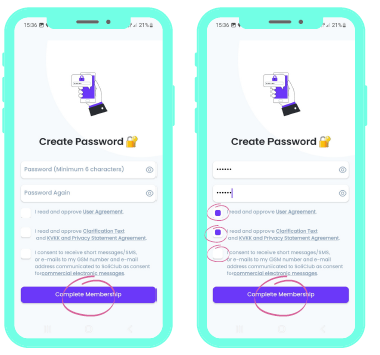 Set a password at least 6 digits long. Enter the password again in the box below to make sure it is correct. After reading the necessary terms and conditions, confirm by clicking on the box next to it and click on the “Next” button.
5) Easy Pass Through The Turnstiles
Enjoy mobile freedom!
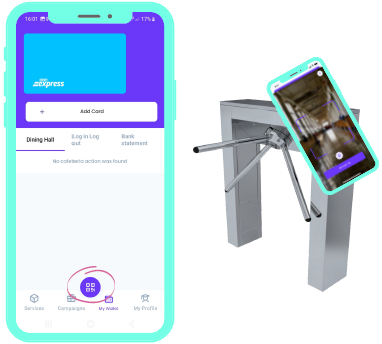 Your registration is complete. Now it's time to enjoy mobile freedom. Log in to the application; easily pass through the turnstiles by scanning the QR code.